
The workspace for building construction claims
Prepare variation, extension of time and loss and expense claims from your own documents, for subcontractors and main contractors
Join the Workspaces launch list
The Claims workspace launches with Workspaces, Quantsurv’s software for quantity surveying and claims. We will email you once, when it opens.

Bob in Claims
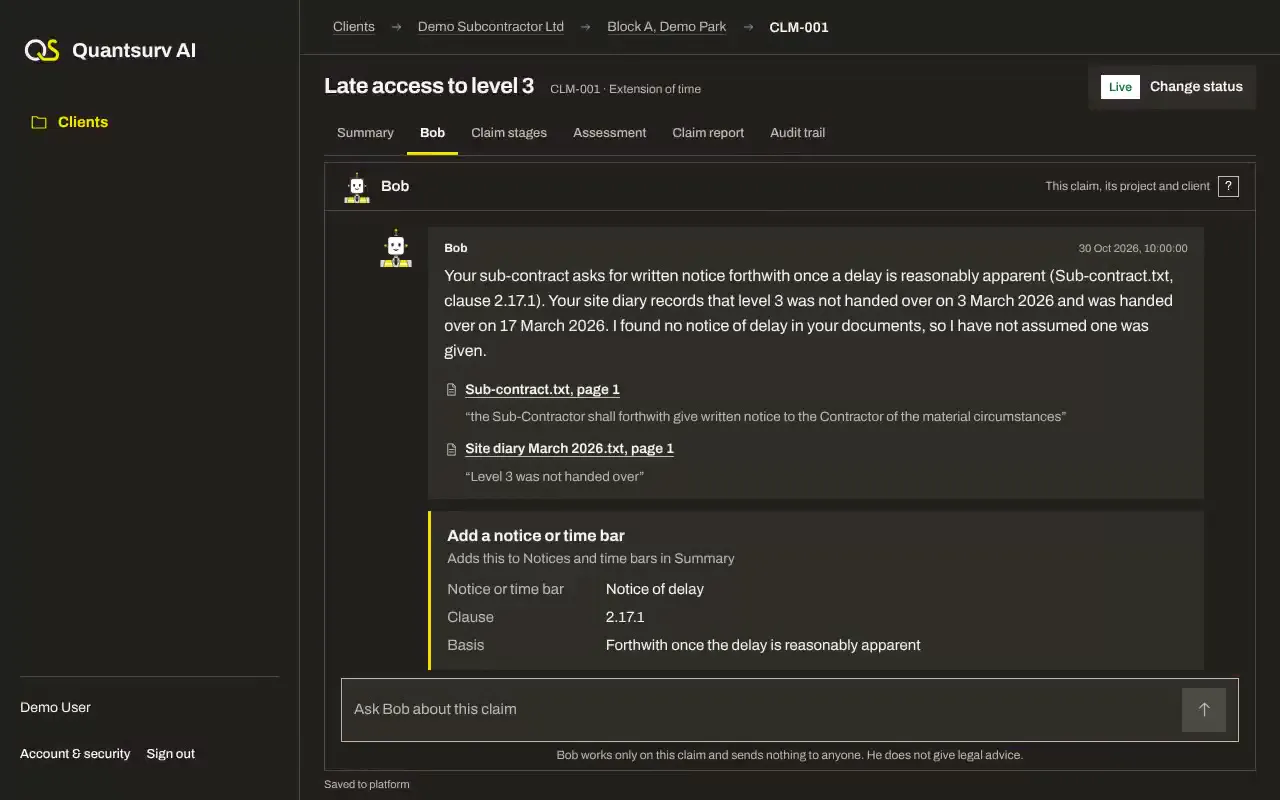
Bob is an AI agent, not a person. In Claims he helps you prepare a construction claim that is complete, evidenced and made on time.
He reads your documents, sets out each part of your claim and tracks every notice it needs
Claims is for you if
- You are a subcontractor or main contractor
- You have a claim for more time or money on construction work in England and Wales
- You want to prepare the claim yourself, with every step recorded

The claims Bob helps with
Variations
For changed or added work that must be valued, under JCT, NEC or FIDIC forms or your own contract
| Use Bob when |
|
|---|---|
| What Bob works out |
|
| What Bob needs from you | Your contract, the instructions or drawings that changed the work, your records of it and any valuation you have sent |
| When Bob hands the claim to Quantsurv | A disputed instruction, a refusal to value the change, or a claim heading to adjudication |
The notices and submissions Bob tracks
Step 01
Confirmation of the instruction
Only if it was not given in writing
Step 02
Notice of the change
Where your contract asks for one
Step 03
Quotation or valuation
Within the period your contract sets
Extension of time
For delay that entitles you to more time to finish, and relief from delay damages
| Use Bob when |
|
|---|---|
| What Bob works out |
|
| What Bob needs from you | Your contract, the programme and its updates, site records and the correspondence about the delay |
| When Bob hands the claim to Quantsurv | Concurrent delay, a dispute over the completion date, or a delay that needs a programme analysis |
The notices and submissions Bob tracks
Step 01
Notice of delay
Once the delay is apparent, within your contract’s period
Step 02
Details of the delay
Its expected effect on completion and the time you claim
Step 03
Updates
While the delay continues, where your contract asks for them
Loss and expense
For the extra cost of delay or disruption that your contract lets you recover
| Use Bob when |
|
|---|---|
| What Bob works out |
|
| What Bob needs from you | Your contract, cost records, the programme and the correspondence about the delay or disruption |
| When Bob hands the claim to Quantsurv | A global claim, a disruption analysis, disputed costs, or a claim heading to adjudication |
The notices and submissions Bob tracks
Step 01
Notice of loss and expense
Once the cost is apparent, within your contract’s period
Step 02
Details of the cost
Your assessment of it, with the records behind it
Step 03
Updates
While the cost continues, where your contract asks for them
Control and security
You decide what goes into your claim
| Your approval | Bob proposes and you decide. Nothing goes into your claim until you approve it. |
|---|---|
| Nothing sent | Bob sends nothing to anyone, and you issue every document yourself |
| Every point traced | Each point Bob makes links to the document and page it comes from. Where the evidence is missing, he says so rather than filling the gap. |
| Notices and time bars | Bob shows each notice period and time bar with the clause it comes from, and you confirm the dates |
| How Bob uses AI | Bob’s AI reads your documents and drafts each part of the claim for you to check. A quote he gives is checked against your document before you see it. |
| Your data and record | Your claims are private to your account and to Quantsurv, and Bob’s AI provider, Anthropic, may process your documents outside the UK. Every upload, change and approval is kept with its date and who made it. Bob’s section of our privacy notice will be published before sign-up opens. Privacy notice |
Bob, a claims consultant or doing it yourself
What each option does for you
With Bob | Hiring a claims consultant | Doing it yourself | |
|---|---|---|---|
| Your claim prepared | Yes | Yes | Yes |
| Notices and time bars tracked for you | Yes | Yes | No |
| Every point linked to its evidence | Yes | Yes | No |
| Gaps in your evidence found for you | Yes | Yes | No |
| A QS ready if it becomes a dispute | Yes | Yes | No |
| A live view of every claim and what it still needs | Yes | No | No |
What Bob does not do
- Give legal advice. Quantsurv is not a firm of solicitors
- Send your claim. You issue every document
- Analyse your programme for delay. Quantsurv does that work
- Promise your claim will be accepted
- Represent you in adjudication or court
Questions about Claims
What is a time bar?
A deadline in your contract for giving notice. Miss it and you can lose the right to claim.
Does Bob send my claim?
No. Bob prepares it with you, and you decide when and how it goes.
How does Bob build a claim?
One part at a time, from your documents: what happened, its effect on time and cost, the clauses it rests on and the evidence for each part
Where are my documents kept?
In private storage for your account. Each file is checked against its original fingerprint every time you download it.
Can Quantsurv check my claim?
Yes. Review My Work has a Quantsurv QS check your claim before you issue it, for a fee agreed first.
Which contracts does Bob read?
JCT, NEC and FIDIC forms and bespoke contracts. Bob reads the clauses in your own contract, so its amendments count.
How is Claims different from the recovery workspaces?
Invoice recovery, Underpayment recovery and Retention recovery recover money that is already due. Claims helps you claim more time or money. Where an underpayment turns on a disputed variation, that variation is a claim.