

Build the report and keep its issued revision
Edit your report, download its Word or PDF file and exhibit bundle, and record the revision you issue yourself
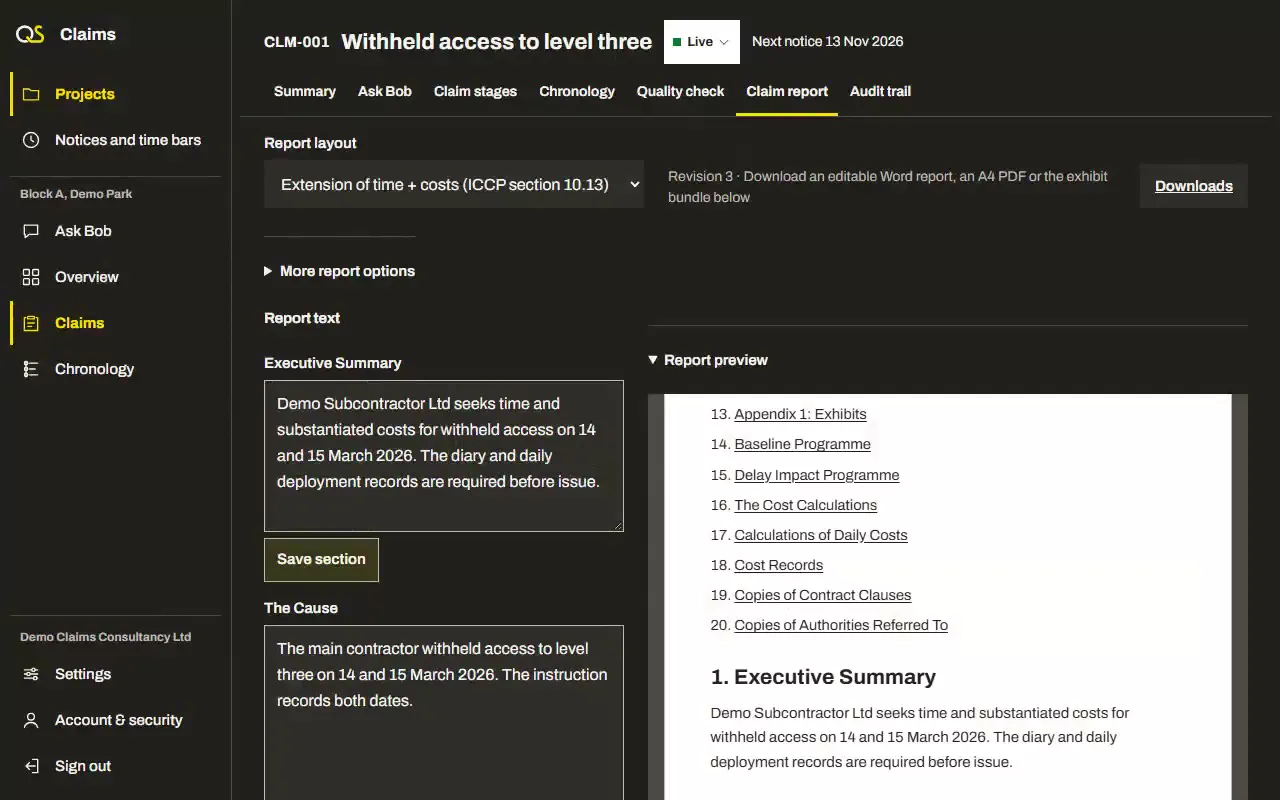
What the report holds
Your saved text, the claim’s figures and the exhibits you select
Layouts for the claim
Choose a layout for extension of time, additional costs, both together or variation
Your report wording
Write each report section yourself or approve Bob’s proposed text into it
Working notes stay separate
Working notes and internal review comments stay out of the ordinary report export
Marked exhibits
The exhibit bundle includes the marked, eligible originals with their numbers and checked fingerprints
Word and A4 PDF
Download an editable Word document or PDF, with the claim’s recorded figures and source references
Record issue and response
After your confirmation, keep the exact issued report and exhibit files and record the other party’s response

Questions about the claim report
Is the report sent for me?
No. You send it yourself and record how and when it was issued.
What if a source is later marked protected?
Report sections with approved proposal provenance need an explicit review before a new export or issue. Check manually copied text yourself; earlier saved files keep their original contents.
More features
Claim stages
Build each claim in order, from its context to the evidence that proves it
Claim context, cause, effect, entitlement, substantiation, records, information requests
Notices and time bars
Keep each notice period and time bar in view, with the clause it comes from
Notices, time bars, clauses, due dates, your confirmation
Chronology
Put confirmed events and their source records in order for each claim
Events, dates, sources, issues, confirmation, exports
Quality check
Review the evidence, gaps and calculations before the claim goes out
Clarity, causation, notice compliance, evidence, calculations, counterarguments
AI agent
Bob reads the claim’s records and helps identify missing evidence for you to review
Reading progress, checked quotations, gaps, information requests, review findings
Security
Keep your claims, and your clients’ claims, private to you
Two-step sign-in, account checks, private documents, audit trail, your data